
 mprove home
 Chronoscope World
 Chronoscope Hamburg
 Guide
Guide vintage photography
 News via LinkedIn
 @chronoHH Mastodon
 bluesky
 Kulturkalender für Hamburg
 IIIF to CWorld
A (Chrome + Firefox) Browser Extension, mprove design 2026
Wow! says Staats- und Universitätsbibliothek Hamburg
A context menu item for links: »Open IIIF book, IA video or geolink in CWorld«.
IIIF manifests and Internet Archive videos are presented as thumbnails.
The menu is applicable to all links that can be imported with Smart Drag’n’Drop [cf. Chronoscope Guide on importing IIIF Books].
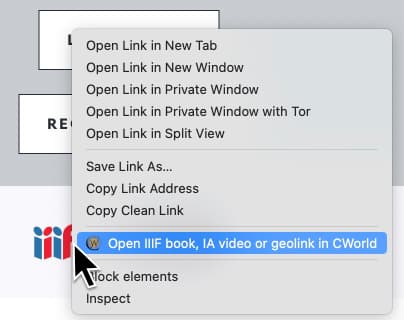
New context menu item for links.
Use Cases
- Open any IIIF manifest link
- IIIF (International Image Interoperability Framework | iiif.io) is a web format for –first and foremost– library collections like old books, newspapers, maps, photos and paintings. IIIF manifest files can be opened by several IIIF viewer plugin. Chronoscope World is a IIIF viewer that runs in your browser on demand.
- Any search result item from a library that supports Smart Drag’n’Drop
- i.e. all (free) books and even videos from Internet Archive
- Such PermaLinks shared elsewhere, like on Mastodon or Bluesky
- Any geo link on Wikipedia pages. This will open the Chronoscope World on that specific coordinates.
Firefox
IIIF to CWorld – Mozilla add-on
Pre-Release for Chrome-like browsers
The extension is not yet distributed via the Web Store. But you can install it from here by following the following steps. Do you follow me?
- Do you have Chrome or Brave? Then Download IIIFtoCWorld_v0.6.zip
- Extract the archive.
Installation in Chrome or Brave:
- Open Window > Extensions
- Enable Developer Mode top right to activate the buttons [Load unpacked] [pack Extension] [Update]
- Click the button [Load unpacked] and choose the folder »IIIF to CWorld«.
- I said the folder, not anything inside.
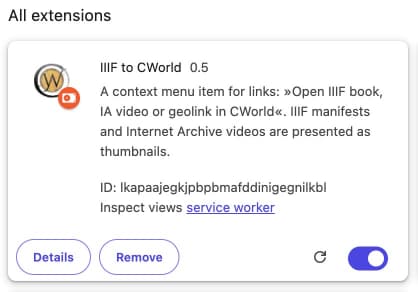
Successfully installed browser extension in Chrome
 Now go to any IIIF provider and right-click on a IIIF manifest link.
Or look for something at the Internet Archive and right-click on a search preview. This can either be a document or a video.
Do you like it? Or not? Please send feedback to  mprove@acm.org
Log
- 12-Jun-2026
- official mozilla add-on release
- 10-Jun-2026
- MIT License
- Submission to Firefox
- 21-May-2026: pre-release 0.6
- support for Firefox
- 21-May-2026: pre-release 0.5
- localization for German, Spanish, French
- experiments and learning what’s possible and useful
- 11-May-2026: initial working prototype